
Price calculator
The price calculator works out what one print costs you, from material, machine time, electricity, labour and failed prints, and turns that cost into a selling price with the margin you want. Use it before you list a product, and again when filament, power or labour costs change. It is free for everyone; Pro adds shipping, marketplace fees, discounts and Excel export.
Where to find it
Section titled “Where to find it”- Free, no account needed: app.3d-farmers.com/calculator.
- In the FarmLoop app: in the upload step, under Tools, click Price calculator. The button works once a file is in the queue. The calculator fills in the print time and the filament weight from that file, and picks the printer and the filament type. Every printer FarmLoop supports is in the preset list; a filament type you have not added stays on your choice. With several files queued, choose one from the list at the top.
- From FarmTools in the app’s left-hand menu. Without a file you enter the print time and filament by hand.
Out of beta since FarmLoop 2.8.
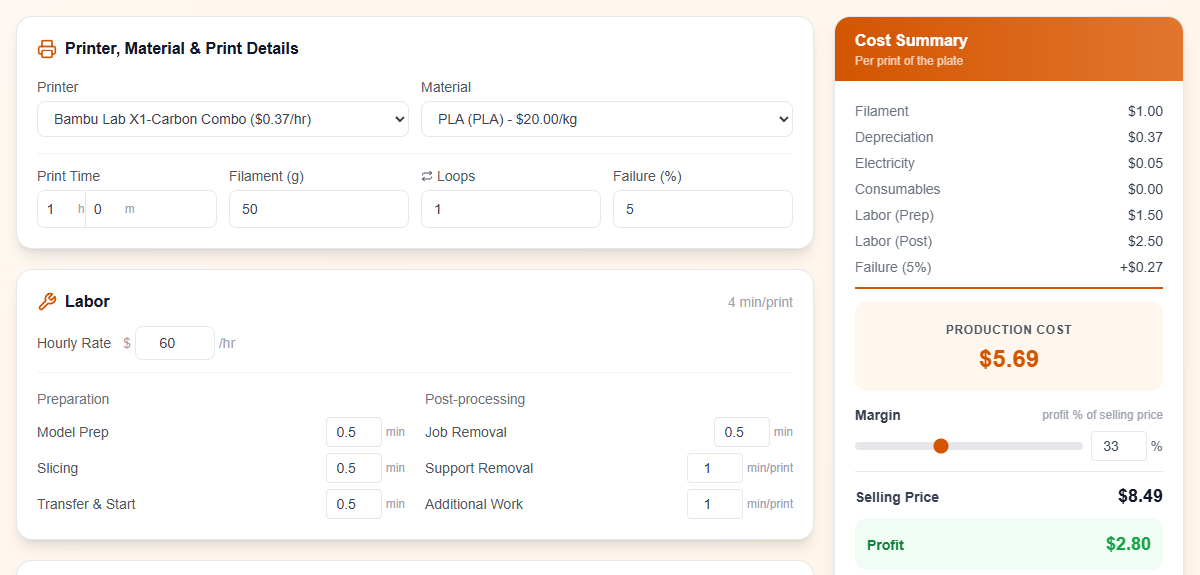
How the price is built
Section titled “How the price is built”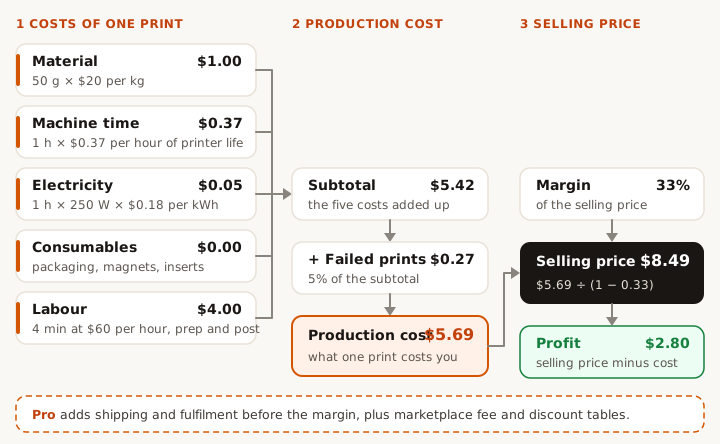
| Line in the Cost Summary | How it is worked out | Default example |
|---|---|---|
| Filament | grams ÷ 1000 × price per kg | 50 g × $20/kg = $1.00 |
| Depreciation | print hours × the printer’s cost per hour: (purchase price + service cost) ÷ lifetime hours | 1 h × ($1,450 + $400) ÷ 5,000 h = $0.37 |
| Electricity | print hours × watts ÷ 1000 × price per kWh | 1 h × 250 W × $0.18 = $0.05 |
| Consumables | quantity × unit cost, for each item you add | none: $0.00 |
| Labor (Prep) | (model prep + slicing + transfer & start) ÷ loops, at your hourly rate | 1.5 min at $60/h = $1.50 |
| Labor (Post) | job removal ÷ loops + support removal + additional work, at your hourly rate | 2.5 min at $60/h = $2.50 |
| Failure | your failure rate × everything above | 5% of $5.42 = $0.27 |
| Production cost | the sum | $5.69 |
| Selling price | production cost ÷ (1 - margin) | $5.69 ÷ 0.67 = $8.49 |
| Profit | selling price minus production cost | $2.80 |
Margin, not markup
Section titled “Margin, not markup”The margin is the share of the selling price that is profit. At 33%, a third of the $8.49 is profit. A 33% markup on the cost would give $7.56 instead. The slider goes from 0 to 90%; the box takes up to 99%.
Loops spread the preparation
Section titled “Loops spread the preparation”Loops is how many times the plate prints from one loop file. You prepare the file once and clear the finished batch once, so the calculator splits the model prep, slicing, transfer & start and job removal over the loops. Support removal and additional work count for every print.
The same example with 10 loops: labour drops from $4.00 to $2.20 per print, the production cost from $5.69 to $3.80, and the selling price at 33% from $8.49 to $5.67.
Free and Pro
Section titled “Free and Pro”| Free page | App, Lite | App, Pro and Business | |
|---|---|---|---|
| Cost Summary, margin, selling price, profit, cost breakdown chart | Yes | Yes | Yes |
| Print time, filament, printer and material filled in from your file | No | Yes | Yes |
| Preset printers and materials | Yes | Yes | Yes |
| Add, edit and delete printers and materials | No | View only | Yes |
| Shipping and fulfilment costs | No | No | Yes |
| Marketplace fees | No | No | Yes |
| Discount analysis | No | No | Yes |
| Export to Excel, load a saved export | No | No | Yes |
What Pro adds
Section titled “What Pro adds”Shipping and fulfilment
Section titled “Shipping and fulfilment”Enter the shipping cost and the fulfilment cost per order. Fulfillment Time is your own packing time per order: the calculator charges it at your hourly rate and adds it to the fulfilment cost. All three are added after the production cost, so the failure rate does not apply to them. The Cost Summary then shows a Total Cost, and the margin is worked out on that total.
Example: $1.20 for the box service plus 4 minutes of packing at $60 per hour gives a fulfilment line of $5.20.
Marketplace fees
Section titled “Marketplace fees”For each platform plan, the table shows the fees on your selling price and the profit left after them:
- Percentage fees (transaction, payment, Offsite Ads) are taken from the selling price.
- Fixed fees per order (payment and listing fees) are added on top.
- A monthly plan fee is split over your Monthly Orders, 200 to start with.
The platforms: Shopify Basic, Shopify, Etsy, Etsy with Offsite Ads at 15% and at 12%, eBay Starter, eBay Basic, Amazon FBM Individual and Amazon FBM Pro. The rates are built in and shown in the Rate column. A negative profit shows in red.
Discount analysis
Section titled “Discount analysis”Price, saving and profit at 0, 5, 10, 20, 30 and 50% off your selling price, so you can see how far a sale can go before you lose money.
Your own printers and materials
Section titled “Your own printers and materials”The gear button next to Printer or Material opens the list. Pro can add, edit and delete entries:
- Printers: purchase price, service cost, lifetime hours, watts and electricity price per kWh.
- Materials: spool price and spool size.
Reset brings back the preset lists. Your lists are saved in the browser you use.
Export to Excel
Section titled “Export to Excel”Export downloads 3DFarmers_PriceCalculation.xlsx, with the inputs, the cost breakdown, the labour and consumables, and the marketplace and discount tables.
Import loads a saved export back into the calculator, so you can keep one file per product and pick it up later. It also reads exports made before FarmLoop 2.8 and the older .csv files. If the printer or material in the file is not in your list, the calculator says so and you pick one.
Good to know
Section titled “Good to know”- Amounts show with a
$sign, and the preset printer and material prices are in US dollars. If you work in another currency, enter your own prices and labour rate, and read the results in that currency. - The preset printers use US list prices from November 2026, 5,000 hours of life and $0.18 per kWh. Set them to what you paid with the gear button (Pro). The failure rate starts at 5%.
- All amounts are for one print of the plate. With Loops above 1, the Cost Summary says so, and the preparation and job removal are shared by the loops.