
FarmLoop firmware
Firmware runs on the FarmBoard control board inside your FarmLoop module. It handles the bending routine, limit-switch gestures, door control (every printer except the A series), and the connection to your printer.
There are two ways to update:
- USB-C flash from your browser (recommended for major versions), plug the controller board into your computer with a USB-C cable and click the button below. Works in Chrome and Edge. Erases the board completely, including saved Wi-Fi and printer settings, then writes the new firmware. On FarmBoard 2 and FarmBoard 3 the board then starts with your printer already set.
- OTA update via the board’s web page (for small updates), enter OTA mode on the running board, open its web UI, and upload the
_OTA.binfile. No cable needed, and your settings are kept.
If you’re not sure which firmware you need, check the printer model and the FarmBoard revision printed on your control board - each FarmBoard generation has its own firmware binary and they cannot be swapped.
Current firmware
Section titled “Current firmware”Bambu A series on the left, every other printer on the right. Choose your printer, and the matching board is preselected. You can still switch the board if yours is different.
Bambu A series
Bambu A1 Mini, A1
Bambu A series · FarmBoard 1
Bambu A1 Mini, A1
Release notes
- Needs FarmLoop App 2.71 or higher.
- SimplyPrint compatible.
- Recognises fl-s2 and FL-S2 file names.
- Wi-Fi reconnects by itself.
- Every print starts clean.
- Board page shows the correct version.
Bambu A series · FarmBoard 2
Bambu A1 Mini, A1
Release notes
- Needs FarmLoop App 2.71 or higher.
- SimplyPrint compatible.
- Recognises fl-s2 and FL-S2 file names.
- Wi-Fi reconnects by itself.
- Every print starts clean.
- Board page shows the correct version.
- No more dropped printer messages.
All other printers
Bambu P/X and H series, Snapmaker, Prusa, Elegoo
Bambu P/X series · FarmBoard 2
Bambu P1P, P1S, P2S, X1C, X1E, X2D
Release notes
- Elegoo Centauri Carbon runs in Mechanical mode for now.
- SimplyPrint compatible.
- Wi-Fi reconnects by itself.
- Every print starts clean.
- LED shows the printer connection.
- Clearing printer details keeps your printer.
- Better support logs.
Bambu P/X series · FarmBoard 3
Bambu P1P, P1S, P2S, X1C, X1E, X2D
Release notes
- Elegoo Centauri Carbon runs in Mechanical mode for now.
- SimplyPrint compatible.
- Wi-Fi reconnects by itself.
- Every print starts clean.
- Correct door travel for the H series.
- Clearing printer details keeps your printer.
- Update check finds every new version.
- Better support logs.
- New setup page design.
FarmBoard 3 needs power from the AMS plug before USB-C flashing. The USB-C port alone doesn't power the chip.
Bambu H series · FarmBoard 2
Bambu H2S, H2D, H2C
Release notes
- Elegoo Centauri Carbon runs in Mechanical mode for now.
- SimplyPrint compatible.
- Wi-Fi reconnects by itself.
- Every print starts clean.
- LED shows the printer connection.
- Clearing printer details keeps your printer.
- Better support logs.
Updating from H series firmware 3.x? Use this file for the OTA update as well, so the board keeps the H series kit.
Bambu H series · FarmBoard 3
Bambu H2S, H2D, H2C
Release notes
- Elegoo Centauri Carbon runs in Mechanical mode for now.
- SimplyPrint compatible.
- Wi-Fi reconnects by itself.
- Every print starts clean.
- Correct door travel for the H series.
- Clearing printer details keeps your printer.
- Update check finds every new version.
- Better support logs.
- New setup page design.
FarmBoard 3 needs power from the AMS plug before USB-C flashing. The USB-C port alone doesn't power the chip.
Snapmaker U1 · FarmBoard 2
Snapmaker U1
Release notes
- Elegoo Centauri Carbon runs in Mechanical mode for now.
- SimplyPrint compatible.
- Wi-Fi reconnects by itself.
- Every print starts clean.
- LED shows the printer connection.
- Clearing printer details keeps your printer.
- Better support logs.
Snapmaker U1 · FarmBoard 3
Snapmaker U1
Release notes
- Elegoo Centauri Carbon runs in Mechanical mode for now.
- SimplyPrint compatible.
- Wi-Fi reconnects by itself.
- Every print starts clean.
- Correct door travel for the H series.
- Clearing printer details keeps your printer.
- Update check finds every new version.
- Better support logs.
- New setup page design.
FarmBoard 3 needs power from the AMS plug before USB-C flashing. The USB-C port alone doesn't power the chip.
Prusa CORE One · FarmBoard 2
Prusa CORE One
Release notes
- Elegoo Centauri Carbon runs in Mechanical mode for now.
- SimplyPrint compatible.
- Wi-Fi reconnects by itself.
- Every print starts clean.
- LED shows the printer connection.
- Clearing printer details keeps your printer.
- Better support logs.
Prusa CORE One · FarmBoard 3
Prusa CORE One
Release notes
- Elegoo Centauri Carbon runs in Mechanical mode for now.
- SimplyPrint compatible.
- Wi-Fi reconnects by itself.
- Every print starts clean.
- Correct door travel for the H series.
- Clearing printer details keeps your printer.
- Update check finds every new version.
- Better support logs.
- New setup page design.
FarmBoard 3 needs power from the AMS plug before USB-C flashing. The USB-C port alone doesn't power the chip.
Elegoo Centauri Carbon · FarmBoard 2
Elegoo Centauri Carbon
Release notes
- Elegoo Centauri Carbon runs in Mechanical mode for now.
- SimplyPrint compatible.
- Wi-Fi reconnects by itself.
- Every print starts clean.
- LED shows the printer connection.
- Clearing printer details keeps your printer.
- Better support logs.
Digital mode is paused for the Elegoo for now. The board runs Mechanical mode, driven by the switch presses in your print file.
Elegoo Centauri Carbon · FarmBoard 3
Elegoo Centauri Carbon
Release notes
- Elegoo Centauri Carbon runs in Mechanical mode for now.
- SimplyPrint compatible.
- Wi-Fi reconnects by itself.
- Every print starts clean.
- Correct door travel for the H series.
- Clearing printer details keeps your printer.
- Update check finds every new version.
- Better support logs.
- New setup page design.
FarmBoard 3 needs power from the AMS plug before USB-C flashing. The USB-C port alone doesn't power the chip.
Digital mode is paused for the Elegoo for now. The board runs Mechanical mode, driven by the switch presses in your print file.
Why one download per printer? On FarmBoard 2 and FarmBoard 3 each printer has its own file. They are the same firmware, but each one starts up already set to its printer: the right kit, the right bender direction and the right door travel. If you change printers later, you don’t need new firmware, just change the Printer Model on the board page.
Previous versions
Section titled “Previous versions”Older firmware is published here so you can roll back if a newer release misbehaves on your setup. Either USB-C flash with the button on the card, or enter OTA mode on the running board and upload the _OTA.bin via its Firmware Update page.
- A series: roll back from v1.61 to v1.50 or v1.40, or all the way to the v1.30 shipping firmware.
- FarmBoard 3: roll back to v1.0.
- P/X series (FarmBoard 2): roll back to v2.94, or to v2.92. (v2.93 is intentionally not offered - it has known multi-loop trigger bugs that v2.94 fixes.)
- H series: roll back to v3.10, or to v3.00.
Rolling back to v2.94 or v3.10 keeps the printer settings already saved on the board when you use the OTA file.
Bambu A Series
Bambu A1 Mini, A1
Release notes
- Requires G-code processed with the FarmLoop App 2.71 or higher.
Download OTA .bin · FB1
Download OTA .bin · FB2
FarmBoard 3 - every printer
Bambu P/X and H series on FarmBoard 3
Release notes
- A much steadier printer connection.
- The LED tells you the connection.
- Better support logs.
- Door blocked detection is off by default.
FarmBoard 3 needs to be powered via the AMS plug before USB-C flashing - the USB-C port alone doesn't power the chip.
Bambu A Series
Bambu A1 Mini, A1
Release notes
- Startup procedure that tests actuators and fan
- Manual triggering only (long-press / triple-tap) - no MQTT
Download OTA .bin · FB1
Download OTA .bin · FB2
Bambu A Series
Bambu A1 Mini, A1
Release notes
- Original shipping firmware, most A-series boards left the factory with this build
- v1.30 itself has no OTA web page, to come back up to v1.40 (or later) you must USB-C flash
- The “Download OTA .bin” button below is only for going to v1.30, by uploading it from a board already on v1.40
Bambu P/X Series
Bambu P1P, P1S, P2S, X1C · FarmBoard 2
Release notes
- Digital Mode (Full MQTT) released: all triggers run automatically from the print’s G-code markers.
- Multi-loop prints fixed: in some cases the first loop ran fine but the following loops did not trigger.
- Serial number entry is case-insensitive - lowercase input is corrected automatically.
Bambu P/X Series
Bambu P1P, P1S, P2S, X1C
Release notes
- Fixed OTA Wi-Fi bug that froze the PCB after setting Wi-Fi credentials
- Improved trigger reliability and stability
- MQTT Trigger option added (enable / disable via OTA page)
Bambu H Series
Bambu H2S, H2D, H2C
Release notes
- Digital Mode (Full MQTT) released: all triggers run automatically from the print’s G-code markers.
- Multi-loop prints fixed: in some cases the first loop ran fine but the following loops did not trigger.
- Serial number entry is case-insensitive - lowercase input is corrected automatically.
FarmBoard 3 needs to be powered via the AMS plug before USB-C flashing - the USB-C port alone doesn’t power the chip.
Download OTA .bin · FB3
Download OTA .bin · FB2
Bambu H Series
Bambu H2S, H2D, H2C
Release notes
- Previous H-series release - MQTT triggering armed per cycle via the 4-tap reset
FarmBoard 3 needs to be powered via the AMS plug before USB-C flashing - the USB-C port alone doesn’t power the chip.
Download OTA .bin · FB3
Download OTA .bin · FB2
How to USB-C flash
Section titled “How to USB-C flash”- Power off your printer and unplug the controller board from AMS / 5V power.
- Plug a USB-C cable from your computer into the controller board’s USB-C port.
- Click “USB-C flash” above, after choosing your printer and board.
- Select the serial port Chrome / Edge shows for the board. It’s usually named
USB-SERIAL,CH340,CP210x, orUSB JTAG/serial debug unit. - Click Install. The browser erases the chip and writes the new firmware. This takes 30-60 seconds.
- When done, unplug USB-C, reconnect AMS / 5V power, and verify the LED startup sequence (see below).
How to OTA update
Section titled “How to OTA update”- Download the
_OTA.binfile for your printer (the “Download OTA .bin” button above, after choosing your printer and board). - Enter OTA mode and open the board’s web page - 5 quick taps on the LIMIT SWITCH (A series) or the DOOR BUTTON (every other printer), join the
FarmLoopWi-Fi, then openfarmloop.local. - Scroll to the Firmware Update card, pick the
_OTA.binfile, and click Upload. - The board reboots automatically after a successful upload.
Getting logs from the FarmBoard
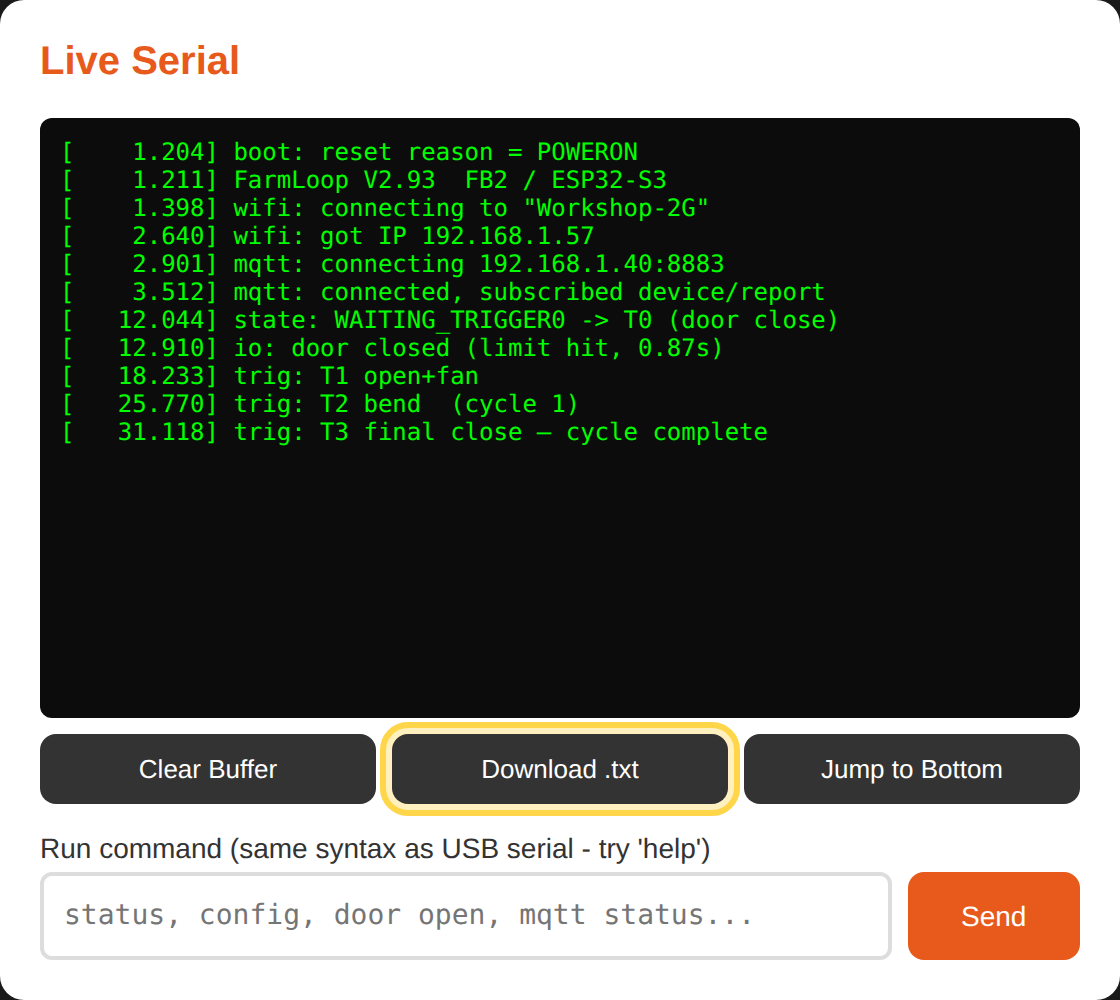
Section titled “Getting logs from the FarmBoard”If you’re reporting a firmware problem, the board’s log is the single most useful thing you can send us - it captures boot reasons, Wi-Fi/MQTT status, and the full trigger sequence. The log lives on the same web page you use for OTA updates.
- Enter OTA mode and open the board’s web page - 5 quick taps on the LIMIT SWITCH (A series) or the DOOR BUTTON (every other printer), join the
FarmLoopWi-Fi network (password3D-Farmers), then openfarmloop.local(or192.168.4.1). - Scroll to the Live Serial card.
- Click Download .txt (highlighted below). Your browser saves a
farmloop_log.txtfile. - Attach that file to a support ticket under Technical issue, along with the
.gcode.3mfof any print that triggered the problem.
Verifying the update
Section titled “Verifying the update”After reboot, the LED shows the startup sequence:
- A series: 3 quick blinks → idle
- Every other printer: 3 quick blinks → 5 slow (Wi-Fi) → 10 fast (printer connection), all three means the board is fully connected to the printer.
If the LED doesn’t follow this pattern, see the LED-signals reference in your printer’s assembly guide:
- Bambu A1 Mini, Operation
- Bambu A1, Operation
- Bambu P/X series, LED signals
- Bambu H2S, H2D, H2C - H-series shares the P/X LED reference.
Troubleshooting
Section titled “Troubleshooting”Browser shows “No device found” when I click Install. Try a different USB-C cable, some cables are power-only and don’t carry data. Also make sure the controller board’s USB-C port is the one you plugged into (not the printer’s USB port).
Flash fails halfway through. Unplug, wait 10 seconds, re-plug, and retry. If it still fails, hold the board’s BOOT button while plugging in USB-C to force bootloader mode, then release once connected.
Flashing succeeded but LED doesn’t blink the startup sequence. Power-cycle the board (unplug AMS / 5V power for 10 seconds). If still nothing, re-flash with the USB-C method, the OTA partition may have been corrupted.
Can I downgrade? Yes - every series has its previous releases in the Previous versions section above (A: v1.50 / v1.40 / v1.30, FarmBoard 3: v1.0, P/X: v2.94 / v2.92, H: v3.10 / v3.00).