
Troubleshooting
Start here if something isn’t working with the actual FarmLoop system in action. For orders, shipping, invoices, or damaged kits, open a support ticket, we handle those by hand.
Quick reference
Section titled “Quick reference”| Issue | First thing to check | What usually fixes it | Full article |
|---|---|---|---|
| Stage 2 print finishes but door / bender doesn’t fire | Does the component test (5 s door-button press) work? | Step through the 4 checks - hardware, activation file, Benchy, FL_S2_ prefix | Stage 2 activation issues |
| Parts won’t detach from the build plate | Is the bed temperature too high? | Raise Z-offset to +0.02 and drop bed temp | Parts won’t detach |
| Bed temperature in G-code ≠ app setting | App writing 5 °C lower than UI? | Add 5 °C to the value you actually want | Temperature mismatch |
| ”Bed leveling failed” error on first run | Is the bender installed? | Remove bender → home → reinstall bender | Bed-leveling errors |
| Fan upgrade not detected | Did you enable Fan Upgrade in the app? | The head needs to reach the top microswitch | Fan upgrade |
No FL_S1_ / FL_S2_ file to download | Did you click Add to Queue (or Process Gcode)? | Clicking the queue button is required | Correct workflow |
| Print is taller than 200 mm | Stage 1 or Stage 2? | 200 mm is a Stage 1 limit, Stage 2 has no cap | Printer compatibility |
| My printer isn’t listed in the app | A-series or P/X-series? | Check the compatibility matrix | Printer compatibility |
Still stuck?
Section titled “Still stuck?”Ask-AI buttons on the right side of this page pass the full guide to your chosen assistant so it can help with follow-up questions.
For a direct human response:
- Contact: Open a support ticket, include your printer model, slicer and its version, and a
.3mffile if you’re debugging a specific print - fastest - Discord: every FarmLoop account can join by connecting the account on the Dashboard; #setup-and-troubleshooting is open to every member
What makes a good support request
Section titled “What makes a good support request”To get you unblocked fast, please include:
- Printer model and firmware version (A1 Mini, A1, P1P, P1S, P2S, X1C, X2D, H2S, H2D, H2C, Snapmaker U1, Elegoo Centauri Carbon, or Prusa Core One)
- Your FarmLoop firmware version (visible on the Firmware page)
- Slicer and its version (Bambu Studio, PrusaSlicer, …)
- The
.3mffile that reproduced the issue, if you’re reporting a slicing or detachment problem - A photo if it’s a hardware or mounting issue
Attaching the .3mf file saves hours of back-and-forth, it tells us your exact slice settings, bed temp, Z-offset, and part geometry in one go.
Getting the FarmBoard log
Section titled “Getting the FarmBoard log”For anything that looks like a firmware or trigger problem (door/bender/fan not firing, MQTT dropouts, unexpected reboots), the board’s log is the most useful thing you can attach. It records boot reasons, Wi-Fi/MQTT status, and the full trigger sequence. You pull it from the board’s built-in web page:
- Open the board’s web page. Enter OTA mode - 5 quick taps on the LIMIT SWITCH (A series) or the DOOR BUTTON (P/X and H series) within 3 seconds - then connect your phone or laptop to the
FarmLoopWi-Fi network (password3D-Farmers) and open http://farmloop.local (orhttp://192.168.4.1). Full details are on the Firmware page. - Scroll to the Live Serial card.
- Click Download .txt (highlighted below) - your browser saves a
farmloop_log.txtfile. - Attach it to a support ticket under Technical issue.
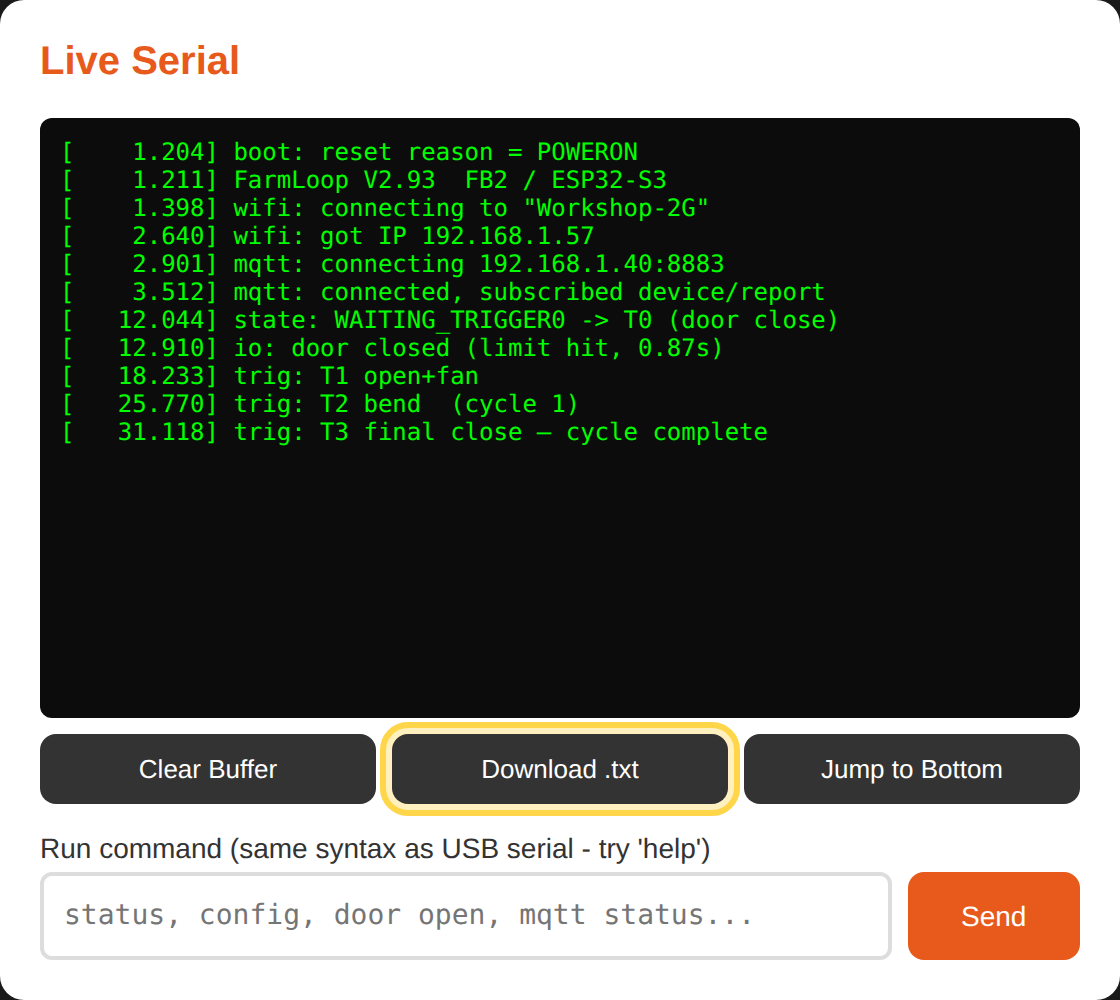
Grab the log soon after the problem happens - the board keeps a rolling buffer, so older events eventually scroll off, and don’t click Clear Buffer before downloading.